Miyerkules, Oktubre 23, 2019

WHAT ARE THE NETWORK DEVICES?


1. HUB- A device used to connect the multi computers with the single device, and then performs like a single network.


2. SWITCH- Similar to a hub, but it keeps a record of the MAC addresses or the unique identity of the client devices connected to it.


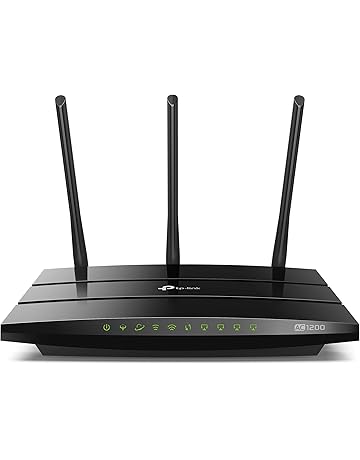
3. ROUTER- is typically connected to at least two networks, commonly two Local Area Networks (LANs) or Wide Area Networks (WANs) or a LAN and its internet service Provider's network.

4. BRIDGE- is used to divide larger networks into smaller sections.


5. NETWORK INTER.FACE- is a device that enables computers to connect to the network


6. MODEM- is a device that converts the digital signals generated by a computer into a analog signals that can travel over conventional phone lines.


7. TRANSCEIVERS- is responsible for placing signals onto the network media and detecting incoming signals travelling through the same wire.


8. FIREWALL- is a networking device that can be either hardware or software-based.


WHAT IS NETWORK TOPOLOGY?


Network topology refers to the layout or structure of the network in relation with the flow of data.


Linear Bus Topology uses one long cable, referred to as backbone, to which computers and other devices are attached.

Star Topology uses central device called a hub with cables extending in all direction.

Ring Topology a type of network topology wherein nodes are connected to each other forming one contiguous pathway in a ring formation.

Mesh Topology originally conceived for military application, mesh networks are structures wherein all the nods on the network can route data traffic in their own.

Hybrid Topology as the name connotes, a hybrid topology is simply a network that uses a mix of any two or more different topologies is a such a way that final network does not exhibit one of the characteristics of the standard topologies.


Miyerkules, Agosto 28, 2019

WHAT IS COMPUTER NETWORK?


Network
is a collection of two or more computers, as well as others related devices, connected together so that information can be exchanged between or among them.

Advantages
  Reduce cost
 Increased Efficiency
Economical
More Productivity
Increased access to communication channels
More efficient patching of software

DISADVANTAGES
Network Failure
Server Error
Prone to hackers
Prone to virus
Location/Distance Problem

Network Media Type

Computer networks
can be built using either wired or wireless technology. Wire technology has been the traditional choice in home, but Wi-Fi wireless technology is quickly gaining ground.

Wired Network
Despite the proliferation of wireless data technology in the home, office, and mobile environment, having wired connection is still the most efficient and practical method of networking. It is important to keep in mind that whether wired or wireless, computer networking follows the same basic principles of sharing information and resources. Think of it as two different ways of achieving the same objective.

Wired connection
are typically used at the network core to interconnection servers and network equipment. It is more reliable over the long term, much faster and more economical. Wireless Technology is usually only used for connecting users to the network, especially for those who demand a certain degree of mobility such as laptop or tablet computer users who roam and transfer to different workplaces from time to time.

Types of Network


  PAN
 is a computer network used to interconnect devices  centered on an individual workplace.

  LAN
 is a type of network where two as much hundreds of computers are connected with each other using a network sharing device known as hub or switch to enable sharing of files, printers, and other resources.

 MAN
 A MAN is a LAN. It involves connecting several networks together that reside within a city, town, or metropolis. On a MAN, users may be several miles apart, but resources appear on the network just as if they were located within the same building.

WAN
 A network consisting of interconnected LANs over a very wide area reaching across continents.

HOW TO BE A RESPONSIBLE NETIZENS?


1.    Be mindful of what you share
In a press statement, the Philippine National Police urged the public to “refrain from posting on social media information that would tend to exacerbate the situation.”
2.    Read beyond the headline
Before sharing stories on social media, make sure to check if the source is reliable and if the information can be backed up with evidence. Another important response is to check the date and make sure the post is not outdated.
3.    Reduce the noise. Do not share unverified reports on social media
Social media can easily get flooded in times of emergencies. Help reduce the noise by not spreading unverified information on social media – especially those that do nothing but provoke fear in the community.
4.    Refrain from sowing unnecessary fear
Terrorist groups like the ISIS have harnessed social media and the Internet to recruit fighters and spread their propaganda. Social media users and the media may unwittingly contribute to the spread of this propaganda.